
 Dynamic Gesture Guide
Installation
WARNING
Before installing, please make sure you have Modular Avatar imported into your Unity project.
Next, download the Dynamic Gesture unitypackage from  BOOTH.
- Import the downloaded unitypackage into your Unity project.
- Locate the prefab at:
Assets/Triturbo/DynamicGesture/Prefabs/Dynamic Gesture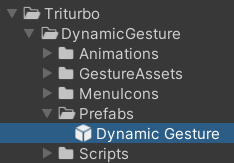
- Drag and drop the prefab into your Avatar hierarchy.
INFO
The prefab already includes a Dynamic Gesture component with a set of default Dynamic Gesture Assets. If you prefer, you can also manually add a Dynamic Gesture component to a GameObject under your avatar and assign your own assets.
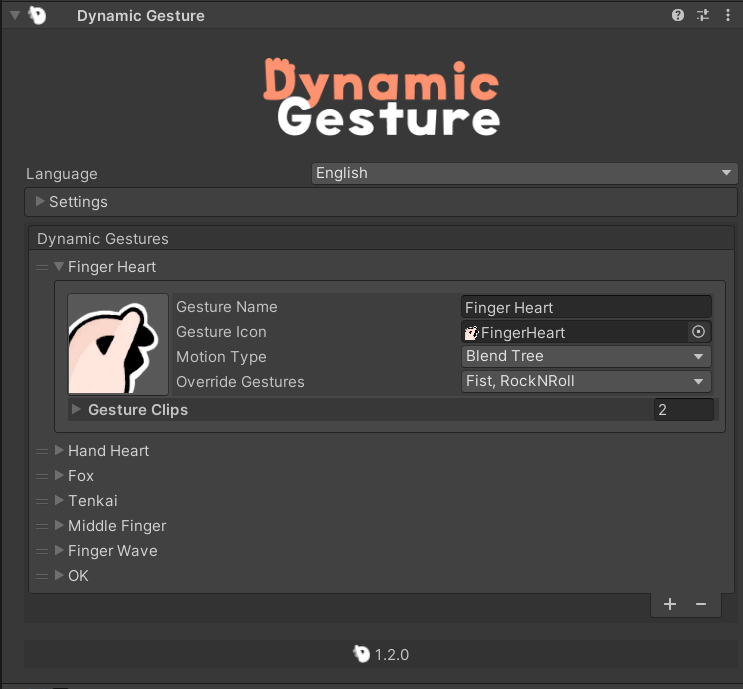
Adding a Gesture Asset
- Assign an existing asset: Drag the asset into the list field of the Dynamic Gesture component.
- Create a new asset: Press the
+button in the inspector to generate a new Dynamic Gesture Asset.
FX Animation
Dynamic Gesture supports FX Animations, which allow gestures to trigger facial expressions or other animated effects.
- Enable FX Animations by checking
Enable FX Animationin the Settings/Animation Settings.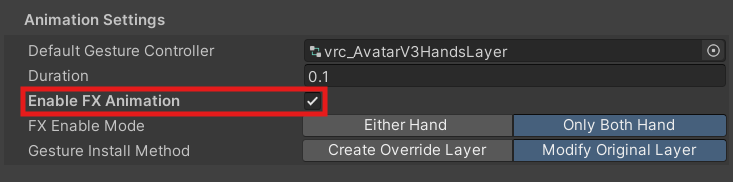
- Assign an animation clip to each gesture slot.
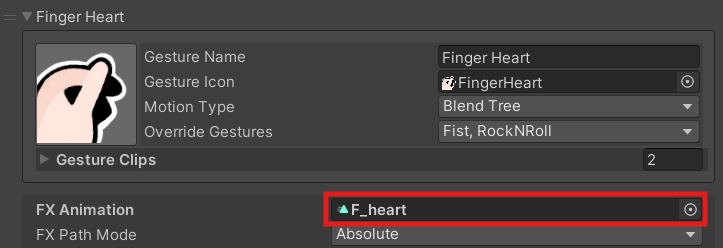
- The animation will play automatically whenever that gesture is performed.
FX Path Mode
You can choose how the animation paths are resolved:
Absolute: Animation root is relative to the avatar’s animator root.
Relative: Animation root is relative to the Dynamic Gesture component itself. Paths will be processed accordingly.
Settings Overview
Enable FX Animation
Turns FX Animation support on or off.FX Enable Mode
Determines how gestures trigger FX Animations:- Either Hand – Plays the animation when either hand performs the gesture.
- Both Hands – Plays the animation only when both hands perform the gesture simultaneously.
Contact Us
If you have any questions, feedback, or need support, feel free to reach out through the following channels: